Training and food have lived in Ellim from day one. As of the latest App Store update, water joins them: water tracking is now built into Ellim for iPhone, and logging it is free.
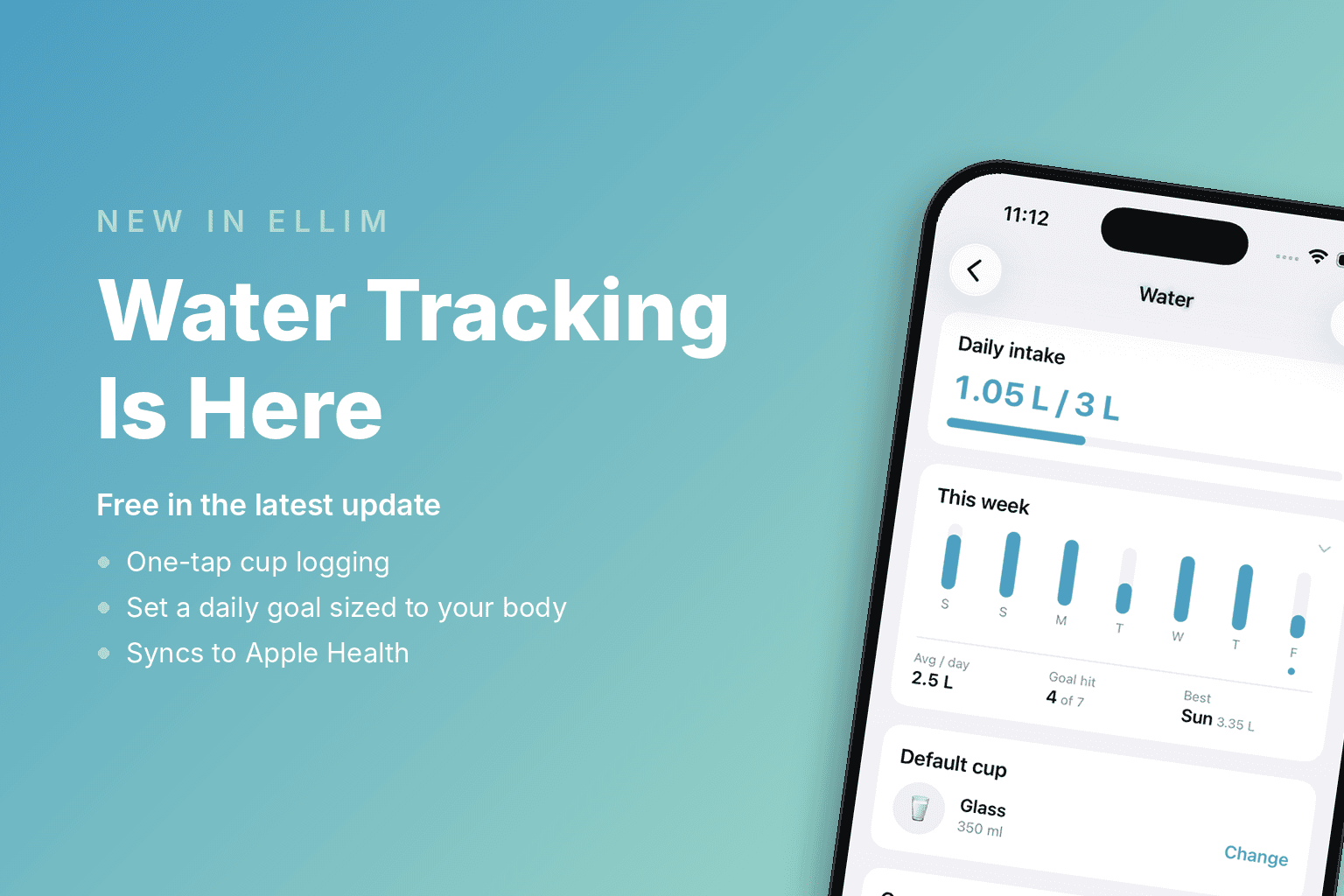
You'll find it on your Today tab. Tap a cup, and you're done.
Why we built it
Hydration is one of the most boring variables in fitness — which is exactly why it gets skipped. Even mild dehydration can affect how you feel and perform during training. If you're already tracking workouts and meals, hydration belongs in the same picture.
Until now, tracking it meant a separate app with its own account, its own reminders, and no idea what your training day looks like. That's the opposite of how Ellim is built: one app, one picture of your day.
How it works
One tap, not one form
Four quick-log cups sit under your daily total: Glass (350 ml), Bottle (500 ml), Jug (1,000 ml), and Sip (150 ml). Every size is customizable, and you can always enter an exact amount instead. Water follows your units setting, so you'll see ml or oz — whichever you use everywhere else in the app. And when a log takes you past your daily goal, the screen celebrates with you.
A goal based on your body, not a slogan
Ellim recommends a daily goal from your body weight (about 35 ml per kilogram — a general guideline, not medical advice), and you can set any target you prefer. Curious what that number looks like for you before you update? Try the free water intake calculator.
Fix yesterday, not just today
Forgot to log at the gym? You can add, edit, or delete entries on past days too. The day view keeps a full list of what you logged, so a mistyped entry never haunts your totals.
Synced to Apple Health, automatically
Turn on Apple Health sync and every entry you log in Ellim is written to Apple Health automatically. Delete that entry in Ellim, and the matching Apple Health entry is removed too. Sync is one-way: Ellim writes your water logs to Apple Health, but doesn't import water logged elsewhere.
See the week, not just the day (Premium)
Daily logging, the day view, and goals are free, just like nutrition tracking. Premium adds the weekly trend chart and hydration history, so you can see whether a heavy training week actually came with the water to support it.
Free vs Premium at a glance
Free | Premium | |
|---|---|---|
One-tap cup logging | ✓ | ✓ |
Custom cup sizes & exact amounts | ✓ | ✓ |
Daily goal + body-weight recommendation | ✓ | ✓ |
Day view with edit & delete | ✓ | ✓ |
Past-day logging | ✓ | ✓ |
Apple Health sync | ✓ | ✓ |
Weekly trend chart | — | ✓ |
Hydration history | — | ✓ |
How to start
Update Ellim to the latest version from the App Store.
Open the Today tab — the water card is waiting there.
Tap a cup. That's the whole workflow.
Workouts, meals, and now water — three parts of your day that affect how you feel and perform, in one place. That's the direction Ellim keeps moving: fewer apps, one honest picture of your day.
Log your first glass in the time it took to read this sentence: Download Ellim free on the App Store →